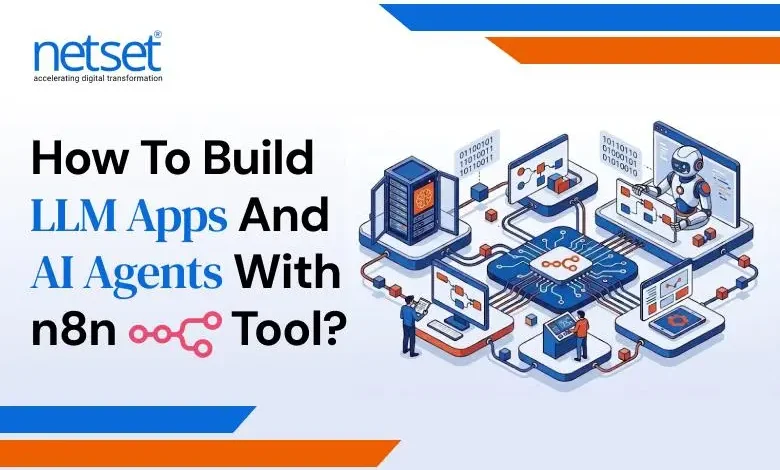
Building LLM-powered applications is no longer constrained by model access. The primary technical bottleneck now is orchestration, how reliably you connect inputs, reasoning, and execution into something that holds up under production workloads.
Typical enterprise developers can integrate APIs from OpenAI and generate outputs. That part is straightforward from an integration perspective. The difficulty shows up when those outputs need to trigger decisions, integrate with external systems, and maintain deterministic execution across diverse input scenarios.
That’s where n8n provides production-grade orchestration.
Instead of building backend-heavy services, you define workflows that:
- Accept structured input
- Process it through an LLM
- Apply conditional logic
- Trigger real-world actions
According to McKinsey & Company, AI-driven automation can deliver 20–40% efficiency gains in operations-heavy workflows when systems are built for execution, not just LLM-based output generation.
This guide walks through building a production-ready AI agent workflow using n8n agentic AI, combining n8n AI automation with LLM, without relying on a complex backend setup.
For organizations evaluating how to build LLM apps and AI agents with n8n for production use cases, NetSet Software Solutions architects orchestration layers that ensure deterministic execution, structured outputs, and reliable system performance at scale.
What You Will Build?
Before getting into setup, it helps to clearly see the end state. You will build a complete AI agent workflow:
Input → LLM → Decision → Action → Output
This system will:
- Receive input via webhook
- Interpret intent using an LLM
- Decide on the next action
- Execute that action via APIs
- Return a structured response
Example: At 2:13 AM, a refund request is submitted. No agent is online. The workflow evaluates eligibility, validates policy conditions, and confirms the refund in under a few seconds, without human intervention.
In real implementations, workflows like this reduce manual effort by 30–50%, especially in support-heavy operations.
This is not a chatbot. This is n8n AI automation where responses directly drive execution.
What is an AI Agent?
An AI agent is not just a model.
It is a system that combines reasoning with execution.
An AI agent:
- Understands intent (LLM layer)
- Decides what to do (logic layer)
- Executes actions (tool/API layer)
The shift is critical:
From generating responses → to triggering outcomes
What is an AI Agent in n8n?
An AI agent in n8n is a workflow that uses a large language model to interpret input, apply decision logic, and execute actions through connected systems.
In n8n agentic AI, the workflow combines:
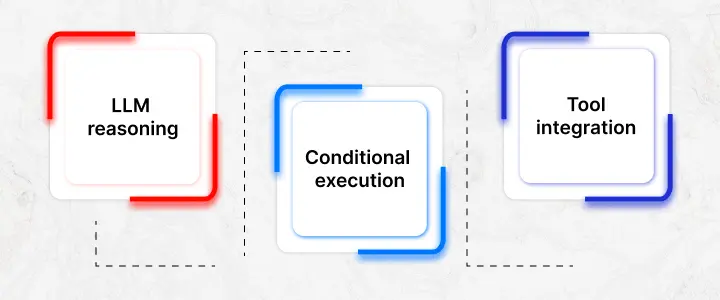
- LLM reasoning
- Conditional execution
- Tool integration
So instead of just producing output, it:
- Understands intent
- Decides what to do next
- Executes that decision
That shift, from response to action, is what makes n8n AI automation viable for real workflows.
Prefer Reading: Top 10 Real-World Use Cases of n8n Workflow Automation
AI Agent Architecture
A standard AI agent workflow looks like this:
User → Webhook → LLM → Decision Layer → Tool/API → Response
Breakdown:
- Input layer captures structured requests
- LLM layer processes intent via OpenAI
- Decision layer routes logic
- The execution layer interacts with APIs
- Response layer returns output
In real-world systems, failures usually occur when:
- LLM outputs are ambiguous
- Decision logic does not cover edge cases
Most failures don’t come from the model itself; they come from how the workflow is structured and validated.
Why Use n8n for LLM Apps and AI Automation?
Not all automation tools are designed for AI workflows.
Tools like Zapier are built for predictable, linear flows. That works when inputs are consistent. AI workflows rarely are.
n8n gives you:
- Vn8n agentic ai,isual workflow orchestration
- Deep API flexibility
- Branching logic
- Self-hosting capabilities
For Large Language Model Development, this matters because:
- Prompts need to be structured
- Outputs need validation
- Workflows must adapt to variability
Rigid automation breaks when inputs vary. n8n handles that variability with better control over logic and execution.
Step-by-Step: Build an AI Agent with n8n for Enterprise AI Automation
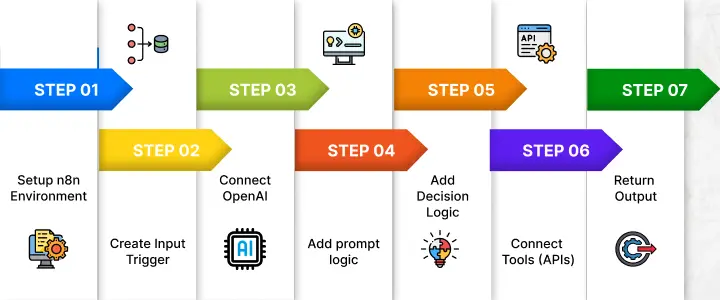
1 . Set up the n8n Environment
- Deploy n8n (cloud or self-hosted)
- Configure environment variables
- Store API keys securely
Self-hosting is often preferred for better control over data and execution.
2. Create Input Trigger
- Use a Webhook node
- Accept structured JSON
- Validate inputs early
Input validation errors at this stage tend to cascade into larger failures later.
3. Connect OpenAI (LLM Layer)
Integrate OpenAI.
Best practices:
- Low temperature for consistent outputs
- Strict JSON output format
- Token limits to control cost
Token usage scales cost directly, so prompt efficiency matters more than most teams expect.
4. Add Prompt Logic (Prompt Engineering)
Define:
- System role
- Contextual inputs
- Output schema
A practical approach is to enforce a fixed JSON structure and reject anything outside it.
Failures in production-ready LLM workflows occur at this stage, not because the model is weak, but because prompts are imprecisely structured and inconsistently formatted.
5. Add Decision Logic
Use IF or Switch nodes.
Example:
- refund → billing API
- complaint → support queue
This is where the workflow starts behaving like n8n agentic AI rather than a simple response engine.
6. Connect Tools (APIs)
Integrate:
- CRM systems
- Databases
- Messaging tools
This layer determines whether your workflow actually executes intended workflow operations.
7. Return Output
- Validate structure
- Enforce consistency
- Return clean responses
Mini Workflow Walkthrough (Real Execution)
To make this concrete, here’s how a simple refund workflow behaves inside n8n:
- Webhook receives a request
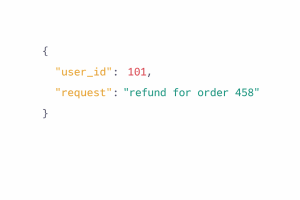
- LLM processes intent
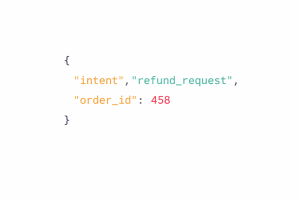
- IF node checks intent
- If refund → continue
- Else → route elsewhere
- API validates eligibility
- Refund is triggered
- Response is returned
This reflects how production workflows are structured, layered, validated, and controlled.
Production Reality: Failure Handling
In production, failures usually come from:
- API rate limits
- webhook timeouts
- malformed outputs
- hallucinated responses
To handle this:
- retries with exponential backoff
- timeout handling
- schema validation
- fallback paths
Adding these layers can reduce failure rates by 40–60% in real systems.
Most internal workflows work initially. They start failing when edge cases, scaling events, and unhandled input scenarios reach the workflow execution layer.
NetSet Software Solutions, a custom AI development company, specializes in building stable n8n AI automation systems designed for real-world production environments.
Add Memory and Context
Stateless workflows struggle with multi-step interactions.
To address this:
- Store session data (Redis/Postgres)
- Pass structured history into prompts
- Maintain continuity across steps
A practical pattern is to use session IDs and inject only relevant context into each execution.
Real Use Cases
1. Customer Support Automation
At 2:13 AM, a refund request is submitted. The system evaluates eligibility, checks order history, processes the refund, and sends confirmation, all within seconds.
2. Lead Qualification
Incoming leads are analyzed, scored, and routed automatically based on intent and data attributes.
3. Internal Workflow Automation
Approvals, validations, and repetitive operational tasks are executed without manual intervention.
These are practical implementations of n8n AI automation, not theoretical examples.
n8n vs Other AI Automation Tools
| Feature | n8n | Zapier | Make |
| Logic Depth | Advanced | Limited | Moderate |
| AI Capability | Strong | Basic | Moderate |
| Customization | High | Restricted | Medium |
n8n AI Agents vs Traditional Backend Development
| Aspect | n8n AI Workflow | Traditional Backend |
| Development Speed | Faster | Slower |
| Flexibility | High | Medium |
| Maintenance | Lower | Higher |
| Iteration | Rapid | Slower |
For AI-driven workflows, faster iteration and flexibility often outweigh traditional backend control.
Performance, Cost & Optimization
To optimize LLM apps:
- Reduce token usage
- Cache repeat queries
- Batch similar requests
- Avoid unnecessary LLM calls
In larger systems, asynchronous execution (queue-based processing) improves reliability and prevents bottlenecks.
Common Mistakes & Failure Scenarios
- Imprecisely structured prompts → inconsistent outputs
- Missing error handling → workflow breaks
- API failures → incomplete execution
- Hallucinated responses → undesired API-triggered outcomes
Fixes:
- Strict schemas
- Validation layers
- Fallback logic
When NOT to Use n8n
Avoid using n8n for:
- ultra-low latency systems
- high-frequency real-time processing
- complex ML pipelines
Deployment, Security & Scaling
For production systems:
- Secure API keys
- Add authentication
- Use queue-based execution
- Monitor workflows
Real-World Deployment Architecture (Production Setup)
A production-ready setup typically includes:
- n8n → orchestration layer
- LLM provider like OpenAI → reasoning layer
- APIs → execution layer
- Queue system (Redis/RabbitMQ) → async processing
- Database → state, logs, and history
This separation ensures scalability, reliability, and maintainability under real workloads.
Monitoring, Logging & Observability
To maintain reliability:
- Track execution logs
- Monitor failures
- Log LLM outputs
- Set up alerting systems
AI workflows don’t fail loudly. Without a system observability framework, issues go undetected until they impact users.
Conclusion
LLM systems failures predominantly arise from workflow orchestration, not model inference. They fail because the workflow around them is not designed for execution.
With n8n, you can build systems that:
- Interpret input
- Apply logic
- Execute actions
Start with one AI agent workflow, test it under real conditions, and expand gradually. That’s how reliable n8n agentic AI systems are built.
Treat this as a production system, engineer for reliability, enforce observability, and align every workflow with measurable business outcomes.
With NetSet Software Solutions, architect, deploy, and scale n8n AI agents into resilient, enterprise-grade systems that consistently deliver performance, efficiency, and ROI, this is where execution becomes ownership.
FAQs
Can production-ready AI agents be built without coding expertise?
Yes, AI agents can be built using no-code platforms like n8n. NetSet Software Solutions guides businesses in workflow automation, improving reliability, maintainability, and system performance even without coding expertise.
How scalable is the enterprise AI agent in automation n8n for AI agent automation?
n8n supports scalable AI automation with proper architecture, including queue management, horizontal scaling, and external databases. NetSet Software Solutions ensures production-grade setups with fault tolerance, consistent execution, and high-performance handling under heavy workloads.
Is OpenAI mandatory for building AI agents?
No, OpenAI is not mandatory. n8n integrates with multiple LLM providers and self-hosted models. Provider selection depends on cost, latency, control requirements, and compatibility with your workflow architecture.
How can hallucinations in AI agents be reduced effectively?
Hallucinations can be reduced by enforcing structured outputs, schema validation, and deterministic workflows. Retrieval layers, context constraints, and post-processing checks help ensure AI responses are accurate, verifiable, and aligned with expected outcomes.
What defines a reliable AI agent workflow in production?
A reliable AI agent workflow includes deterministic logic, observability, error handling, and validation layers. Consistent execution, edge case management, and seamless integration with external systems are critical for production reliability.