You start with a simple ask. Add a chatbot. Auto-tag support tickets. Summarize calls. Predict churn. Then suddenly you are in five meetings about data pipelines, security reviews, model costs, and whether your current backend can handle one more async job without timing out.
And here’s the truth most teams learn the hard way.
The hard part is not the model. It’s integration.
It’s getting AI into your existing product without breaking your architecture, your workflows, your compliance posture, or your roadmap.
This guide is about doing it the calmer way. Practical patterns, tradeoffs, and a few “please do not do this in production” moments. The goal is simple: introduce AI like you would any other critical capability. Incrementally. Measurably. With rollback buttons.
If you’re trying to do this inside a real business, with real users, and a stack you cannot throw away, this is for you.

Why AI projects break stacks in the first place
Most stacks don’t “break” because AI is too advanced.
They break because teams bolt AI into places that were never designed for probabilistic outputs, variable latency, and data sensitivity. A few common failure modes show up again and again:
- Misalignment of expectations: Often teams underestimate the complexity of integrating AI solutions into existing systems.
- Inadequate infrastructure: Many businesses lack the necessary infrastructure to support advanced AI functionalities.
- Poor planning: Integration requires careful planning and execution to avoid disrupting current operations.
- Lack of expertise: Not having skilled professionals on board can lead to catastrophic failures during integration.
- Ignoring compliance issues: AI integration must adhere to strict compliance regulations which are often overlooked.
To mitigate these risks, it’s advisable to hire dedicated developers who have experience in AI integration and understand the nuances involved.
Moreover, if you’re facing challenges with your current stack or need assistance in navigating through the complexities of AI integration, don’t hesitate to reach out for help through our contact page.
1) Treating AI like a deterministic API
A typical API returns the same output for the same input. AI does not. Even with temperature set low, you’re still dealing with fuzziness.
So when you wire AI directly into core flows like billing, eligibility, or inventory updates, things get weird fast.
2) Pulling production data into prompts without guardrails
Someone needs “context”, so they dump customer records, internal notes, maybe even attachments, straight into the model.
Even if you trust your model provider, this creates privacy risk, retention risk, and compliance headaches. Also, it is usually unnecessary.
3) Latency hits user experience
LLMs can be slow. Some calls come back in 700ms, some in 12 seconds. If you make the AI response a blocking part of the UI, your app now feels broken.
4) No evals, no monitoring, no cost controls
AI goes live, users love it, usage spikes, and the bill follows. Meanwhile hallucinations slip through because nobody built evaluation and feedback loops.
5) “We’ll refactor later”
Later becomes never. AI duct tape hardens into architecture. Then your stack actually does break.
The integration mindset that keeps you safe
Before tools and patterns, the mindset.
Think “capability”, not “feature”
“Add AI” is not a requirement. A requirement is something like:
- Reduce average support handle time by 20%
- Increase lead to meeting conversion by 10%
- Cut manual invoice reconciliation work by 50%
- Improve search success rate for internal docs
Now AI becomes one possible implementation. Not the whole plan.
Make AI optional at runtime
This is the simplest rule that saves teams.
If AI fails, your product should still work.
Degraded mode should be acceptable. Maybe less magical, but stable.
Keep the blast radius small
Start with AI in “assistive” zones:
- Suggestions, summaries, drafts
- Classification and routing
- Internal tooling
- Background enrichment
Avoid putting AI in charge of irreversible actions until you’ve earned that trust.
The safest architecture pattern: AI as a sidecar service
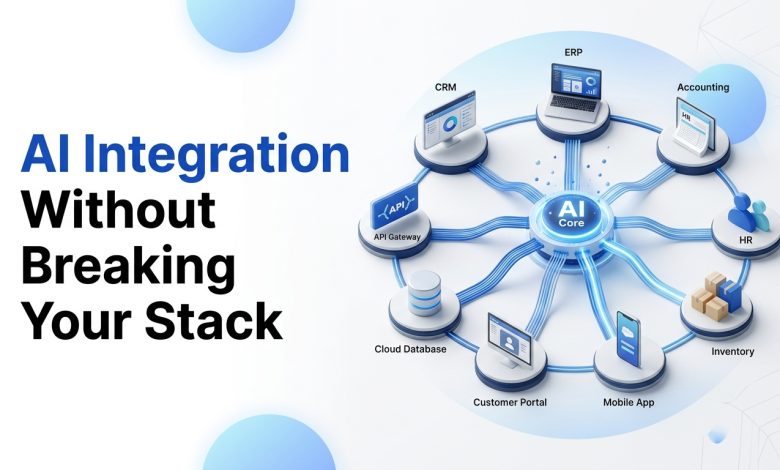
If you want AI integration without your app turning into a spaghetti bowl, use a sidecar.
What this means
You build an AI layer as a separate service (or set of services) that your core app calls.
Instead of embedding prompt logic into your monolith or scattering it across microservices, you centralize:
- Model selection (OpenAI, Gemini, Claude, local models)
- Prompt templates and versioning
- RAG pipelines
- Safety policies and redaction
- Rate limiting and cost tracking
- Logging and evaluation hooks
Why it works
- You can rollback prompt versions without redeploying your main app
- You can swap model providers with minimal changes
- You keep secrets and policies in one place
- Your main product stays predictable
A simple flow looks like:
- App sends request to AI service: intent + context IDs (not raw data)
- AI service fetches approved context from data layer
- AI service runs RAG or tool calls
- AI service returns a structured response (ideally JSON)
- App renders and stores results with metadata

Incorporating AI into your custom web application development can be a game-changer. However, it’s crucial to ensure that the core functionality of your product remains intact even when the AI component is not operational. This principle of making AI optional at runtime is essential for maintaining stability and user satisfaction.
When implementing AI features, it’s advisable to start by keeping the blast radius small. This means using AI in areas where its failure won’t lead to significant disruptions. Suitable “assistive” zones include suggestions, summaries, drafts, classification and routing, internal tooling, and background enrichment.
Always remember to avoid putting AI in charge of irreversible actions until you’ve established a solid trust in its capabilities.
The safest architecture pattern for integrating AI into your application is by treating it as a sidecar service. This involves building an AI layer as a separate service that your core app calls. By doing this, you centralize various aspects such as model selection, prompt templates and versioning, RAG pipelines, safety policies and redaction, rate limiting and cost tracking, logging and evaluation hooks.
This approach has several advantages:
- It allows for rollback of prompt versions without redeploying your main app.
- You can swap model providers with minimal changes.
- It keeps secrets and policies in one place.
- Your main product stays
RAG without the mess (and why most RAG fails quietly)
Retrieval Augmented Generation is the default answer to “how do we make AI use our company data”.
But a lot of RAG implementations are… not great. They “work” in demos, then fall apart with real documents.
The common RAG mistakes
- Ingesting everything without cleaning (garbage in, confident garbage out)
- Chunking without meaning (splitting mid table, mid sentence)
- No metadata filters (so the model pulls irrelevant docs)
- No freshness strategy (stale data leads to wrong answers)
- No citations (hard to trust, hard to debug)
A cleaner RAG approach that doesn’t wreck your systems
Do it in layers:
- Source control: decide which repositories are allowed (Notion, Confluence, Google Drive, PDFs, DB tables)
- Normalization: clean text, strip boilerplate, preserve headings and tables where possible
- Chunking with structure: chunk by section, not by raw token count
- Metadata: department, doc type, access level, last updated, product area
- Indexing: vector DB plus keyword fallback (hybrid search usually wins)
- Retrieval policy: filter first, then retrieve, then rerank
- Answer contract: return answer plus citations and confidence signals
And please. Add access control. If a user cannot see a document in your app, they should not see it via AI either.
Tool calling and agents, without turning your backend into chaos
Agents are useful. They can also be dangerous.
The safe way to think about agents is: AI proposes, your system disposes.
This principle can help maintain order in your backend while leveraging the power of agents. However, it’s essential to ensure that the data accessed by these agents is secure and well-managed.
In this context, integrating advanced technologies such as blockchain into your data management strategy could be beneficial. Blockchain technology provides a robust solution for ensuring data integrity and security while allowing for efficient retrieval and usage of company data by AI systems.
A practical pattern: “Tools with strict schemas”
Instead of letting the model “decide” freely, define tools like:
search_customers(query, filters)create_support_ticket(customer_id, summary, priority)schedule_demo(lead_id, timeslot)generate_invoice_adjustment(invoice_id, reason_code, amount)
Then enforce:
- JSON schema validationx
- permission checks
- rate limits
- idempotency keys
- audit logs
The model becomes a planner. Your services remain the authority.
Where agentic AI fits best right now
- Internal ops workflows (finance ops, HR, support)
- Sales enablement (research, outreach drafts)
- IT automation (ticket triage, runbook guidance)
- Data tasks (dedupe suggestions, enrichment)
Where to be cautious
- Anything that moves money automatically
- Anything that deletes data
- Anything that changes customer access permissions
- Anything regulated without human approval
Data privacy and compliance: the stuff that can actually hurt you
If you want AI in healthcare, finance, logistics, government, even retail at scale, privacy becomes the project.
A reasonable baseline checklist:
1) Data minimization
Send the model only what it needs. Prefer IDs and short excerpts over entire records.
2) Redaction
Mask PII where possible. Names, emails, phone numbers, addresses, payment data, health identifiers.
3) Tenant isolation
In multi-tenant SaaS applications like those described in this Node.js multi-tenancy guide, it’s crucial to enforce tenant filters in retrieval and tool calls. Do not trust prompts to do that.
4) Retention and logging policy
Decide what you log. Prompts may contain sensitive data. Log hashes, references, and metadata when you can.
5) Human in the loop for sensitive workflows
Especially in regulated industries. Approvals are not a failure. They are a safety feature.
Performance and cost: how teams get surprised
AI integration changes the shape of your traffic. It’s not just more requests, it’s heavier requests.
Tactics that keep you sane
- Cache results where appropriate (summaries, classifications)
- Batch background jobs (process 100 items overnight vs real time for each)
- Use smaller models for simple tasks (routing, extraction)
- Use timeouts and fallbacks in the UI
- Stream outputs for chat and long responses
- Budget per user / per workspace and enforce quotas
A simple rule: if it doesn’t need to be real time, don’t make it real time.
A step by step rollout plan that rarely backfires
Here’s a rollout sequence that works for startups and enterprises. Different scale, same principles.
Step 1: Pick one workflow with measurable value
Example: “Auto summarize customer calls into CRM notes.”
You can measure time saved, adoption, and quality.
Step 2: Define the output contract
Not “a nice summary”. More like:
- Title
- 5 bullet recap
- 3 action items
- 1 risk flag
- CRM fields to update
Structured output is easier to validate and safer to integrate.
Step 3: Add observability from day one
Track:
- latency
- cost per request
- failure rates
- user edits (a proxy for quality)
- thumbs up/down feedback
- citation coverage (for RAG)
In conjunction with these steps, it’s also important to consider developing a Minimum Viable Product (MVP) during your AI integration process. This approach allows teams to test their assumptions and gather valuable user feedback before fully committing to a particular strategy. For more insights on this topic, refer to this MVP development guide.
Step 4: Run it as assistive first
Let users accept, edit, or reject. Collect real feedback.
Step 5: Harden, then expand
Add redaction, access control, eval suites, and regression tests. Then roll into other workflows.
Real world examples (the kind you can actually copy)
Example 1: Retail ops
Problem: Inventory team wastes hours reconciling stock discrepancies across POS, warehouse, and supplier sheets.
AI integration: Background AI job that classifies discrepancy reasons and generates suggested adjustments with evidence links.
Why it doesn’t break the stack: AI only suggests. Your inventory service remains the source of truth. Approvals required for updates.
Business impact: Fewer manual checks, faster reconciliations, less shrink confusion.
Example 2: Healthcare admin
Problem: Staff spends too long summarizing patient interactions and coding notes.
AI integration: AI drafts summaries and code suggestions using a RAG layer restricted to approved templates and internal policy docs.
Why it doesn’t break the stack: PHI is minimized, redacted where possible, human review stays in place.
Business impact: Faster documentation, better consistency, less burnout.
Example 3: SaaS support
Problem: Support replies are inconsistent and slow, especially for long threads.
AI integration: AI assistant that drafts responses, pulls relevant knowledge base citations, and updates ticket tags automatically.
Why it doesn’t break the stack: Drafts only, agent sends. Tagging is automated but reversible.
Business impact: Lower handle time, faster first response, better QA.
What to look for in an AI integration partner
You can build this internally, sure. Many teams do. But if you want to move quickly without playing security roulette, you want a partner who treats AI like production software, not a hackathon demo.
A good partner should be able to:
- design a sidecar AI architecture that fits your stack
- build RAG with access control and quality checks
- implement tool calling with strict schemas and auditability
- set up evaluation pipelines and monitoring
- ship incrementally without blocking your core roadmap
This is the kind of work NetSet Software does as a technology partner. Whether it’s across custom software development or ready-to-launch software solutions, they have got you covered. They provide assistance in areas such as enterprise systems, mobile apps, AI agents, and integrations. If you want help scoping the safest first use case, or you already have a messy prototype you need to productionize, start here: NetSet Software
FAQs
How do we add AI without refactoring our whole backend?
Use an AI sidecar service. Keep prompts, model logic, RAG, and safety policies out of the core app. Integrate through clean APIs and structured outputs.
Should we fine tune a model or use RAG?
Most business apps should start with RAG. Fine tuning makes sense when you need consistent style or specialized extraction, and you already have high quality labeled data.
Can we integrate multiple LLM providers safely?
Yes, if you abstract the model layer in your AI service. Route tasks by cost and quality. Also keep provider specific quirks isolated.
How is maritime technology reshaping the global shipping industry?
For insights on this topic, check out how maritime technology is reshaping the global shipping industry.
How do we prevent hallucinations?
You don’t “prevent” them completely. You reduce them with retrieval, constraints, structured outputs, citations, and human review for sensitive workflows. Then you monitor and iterate.
What’s the biggest hidden cost in AI integration?
Operational cost. Logging, monitoring, evals, security reviews, and prompt versioning. Treat it like any other production system.
Trends to watch (so your AI work still matters next year)
A few things are becoming standard:
- Smaller models doing more: routing simple tasks to cheaper models is turning into best practice.
- Structured generation everywhere: JSON outputs, schemas, and validation. Less “chatty magic”, more reliable automation.
- Agentic workflows with guardrails: tools, permissions, audit trails. These are agentic workflows that operate like supervised employees.
- On device and private inference: for sensitive workloads and latency critical mobile experiences.
- Unified search plus action: AI that not only answers but can trigger workflows in CRM, ERP, HRMS, and support systems safely.
Wrap up (the simple version)
AI integration is not about chasing the newest model.
It’s about adding a new capability to your product without destabilizing everything else that keeps your business running. Sidecar architecture, RAG with governance, tool calling with strict rules, and a rollout plan that includes monitoring and human feedback. That’s the path that usually works.
If you want a team that can help you implement this with your current stack without drama, NetSet Software is a solid place to start:
FAQs (Frequently Asked Questions)
Why do AI integration projects often cause existing tech stacks to break?
AI projects typically break tech stacks not because AI is too advanced, but because teams bolt AI into systems that weren’t designed for probabilistic outputs, variable latency, and data sensitivity. Common failure modes include misaligned expectations, inadequate infrastructure, poor planning, lack of expertise, and ignoring compliance issues.
What is the main challenge in integrating AI into existing products?
The hard part of AI integration is not the model itself but the integration process—getting AI into your existing product without breaking architecture, workflows, compliance posture, or roadmap. Proper planning and incremental implementation are essential.
How should teams treat AI differently from traditional deterministic APIs during integration?
Unlike typical APIs that return consistent outputs for the same input, AI produces probabilistic and sometimes fuzzy results. Integrating AI directly into critical flows like billing or inventory without accounting for this fuzziness can lead to unexpected behavior and system instability.
What best practices help ensure safe and effective AI integration?
Adopt an integration mindset focusing on capability rather than just adding features. Make AI optional at runtime so the product works even if AI fails. Keep the blast radius small by starting with assistive roles like suggestions or classification before entrusting AI with irreversible actions.
What is the ‘sidecar service’ architecture pattern for AI integration and why is it recommended?
The sidecar service pattern involves building a separate AI layer that your core app calls. This centralizes model selection, prompt management, safety policies, rate limiting, logging, and evaluation. It allows rollback of prompt versions without redeploying the main app, keeps secrets secure, and maintains predictable product behavior.
How can businesses mitigate risks associated with AI integration in their existing stacks?
To mitigate risks like privacy breaches and compliance issues, avoid pulling raw production data directly into prompts without guardrails. Hire dedicated developers experienced in AI integration who understand these nuances. Also implement monitoring, evaluation loops, cost controls, and maintain rollback options to manage unexpected behaviors effectively.